

 Eduardo Rigo
Why Show What I'm Listening To?
I wanted my portfolio to feel alive — not just a static list of projects. Showing what I'm currently playing on Spotify adds a personal touch and gives visitors a glimpse of who I am beyond code.
The problem? Spotify's API isn't exactly plug-and-play. There's an OAuth dance, refresh tokens, and edge cases to handle when nothing is playing.
The OAuth Flow (The Painful Part)
Spotify uses OAuth 2.0 with Authorization Code Flow. Here's the high-level:
- You authorize the app in the Spotify Developer Dashboard
- You get an authorization code (one-time use)
- Exchange it for an access token + refresh token
- The access token expires every hour — the refresh token is your lifeline
The tricky part is getting that initial refresh token. You need to manually hit the authorization URL in your browser, grab the code from the redirect, and exchange it via cURL:
curl -X POST https://accounts.spotify.com/api/token \
  -H "Authorization: Basic <base64(client_id:client_secret)>" \
  -d grant_type=authorization_code \
  -d code=<your_auth_code> \
  -d redirect_uri=http://localhost:3000/callback
Once you have the refresh token, store it as an environment variable. You'll never need to do this again (unless you revoke access).
The Route Handler
I built an Edge Runtime API route that handles the full flow on each request:
// 1. Exchange refresh token for a fresh access token
const getAccessToken = async () => {
  const body = new URLSearchParams({
    grant_type: 'refresh_token',
    refresh_token: refresh_token
  })

  const response = await fetch(TOKEN_ENDPOINT, {
    method: 'POST',
    headers: {
      Authorization: `Basic ${btoa(`${client_id}:${client_secret}`)}`,
      'Content-Type': 'application/x-www-form-urlencoded',
    },
    body: body.toString(),
    cache: 'no-store',
  })

  return response.json()
}
The btoa() call encodes the client credentials as Base64 — Spotify requires this for the token endpoint.
Now Playing vs. Last Played
The API has two relevant endpoints:
/v1/me/player/currently-playing— returns the currently playing track (or204 No Contentif nothing is playing)/v1/me/player/recently-played— returns the last 50 played tracks
My logic is simple: try "now playing" first, fall back to "recently played":
const nowPlaying = await getNowPlaying(access_token)

if (nowPlaying?.is_playing && nowPlaying.currently_playing_type === 'track') {
  return { isPlaying: true, title: nowPlaying.item.name, ... }
}

// Nothing playing — grab the most recent track
const lastPlayed = await getLastPlayed(access_token)
const mostRecent = lastPlayed.items.sort(
  (a, b) => new Date(b.played_at).getTime() - new Date(a.played_at).getTime()
)[0]

return { isPlaying: false, title: mostRecent.track.name, ... }
The Client Side: SWR for Real-Time Updates
On the frontend, I use SWR to poll the API every 10 seconds:
const { data, isValidating, mutate } = useSWR<SpotifyData>(
  '/api/spotify',
  fetcher,
  {
    refreshInterval: 10000,
    revalidateOnFocus: false,
    dedupingInterval: 5000,
  }
)
This gives me:
- Auto-refresh every 10 seconds
- Deduplication to avoid hammering the API
- A
mutate()function for the manual refresh button - The album art spins with a Framer Motion animation when a track is playing
Caching: Don't Cache This
Since the whole point is real-time data, caching is the enemy:
export const runtime = 'edge'
export const dynamic = 'force-dynamic'

// Plus aggressive no-cache headers on every response
const headers = {
  'Cache-Control': 'no-cache, no-store, must-revalidate, max-age=0',
  'Pragma': 'no-cache',
  'Expires': '0',
}
Edge Runtime keeps the cold start fast, and force-dynamic ensures Next.js doesn't try to statically optimize the route.
Gotchas I Hit Along the Way
- The refresh token can expire if you don't use it for 6 months or if you revoke access. Store it somewhere safe.
- Podcasts break things — the
currently-playingendpoint returns podcasts too. Always checkcurrently_playing_type === 'track'. - Rate limits — Spotify allows ~180 requests per minute. With 10s polling and a handful of visitors, you're fine. But don't go lower.
- Environment variables — I use both
SPOTIFY_*(server) andNEXT_PUBLIC_SPOTIFY_*(legacy) with a fallback pattern.
The End Result
A small card that shows what I'm listening to in real time, with a spinning album cover and a relative timestamp for the last played track:

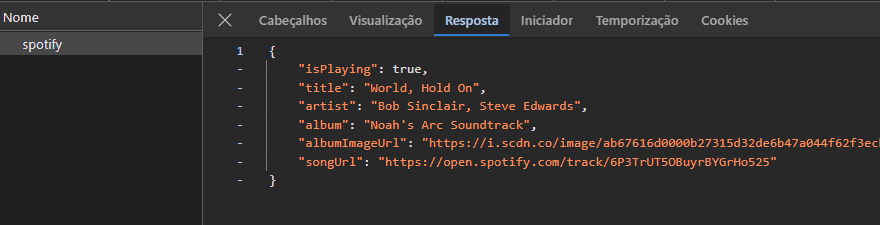
And here's the raw API response that powers it — hitting /api/spotify returns everything the frontend needs:
It's a tiny feature, but it makes the site feel like more than a resume.